

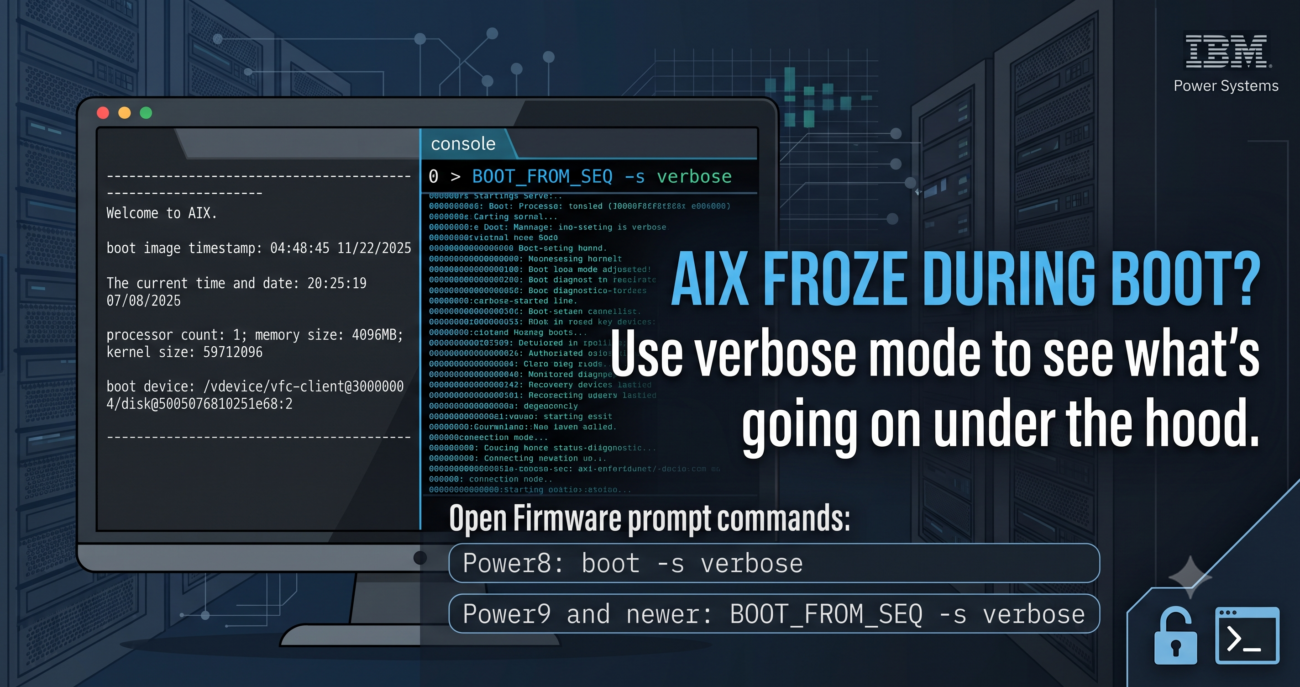
Every IBM Power Systems administrator eventually encounters the “Black Box” scenario: an LPAR is triggered to reboot, no Reference Code appears on the HMC, and the terminal remains frozen—often stuck on a generic message or no message.
This leaves you with a critical diagnostic dilemma: Has the system actually crashed, or is it still booting so slowly that it just feels like nothing is happening? When a failure occurs deep within the boot sequence—long before you can ever get a login prompt—standard monitoring tools give you zero visibility. You are left guessing. How do you find out exactly what is going on behind that black screen?
To diagnose a silent hang, you must bypass the standard automated boot sequence and force AIX into Verbose Boot Mode via the Open Firmware prompt. This step-by-step guide covers how to enable this mode on-premises, in the cloud, and how to successfully capture the output for troubleshooting or IBM Support analysis.
The Diagnostics Dilemma: Standard vs. Verbose Boot
During a normal boot, AIX suppresses low-level kernel and subsystem initialization logs to keep the console clean. However, if the boot process stalls:
- The LPAR console will show no progress indicators.
- The HMC may clear its SRC code, leaving you with an empty status or a misleading code.
By switching the LPAR boot mode to the Open Firmware OK prompt, you gain access to the system’s low-level Open Firmware environment. From there, passing the verbose flag forces the operating system to print every single subsystem initialization step directly to the screen, exposing hidden errors.
Step 1: Preparing for Capturing Data from Verbose Mode
Open Firmware verbose boot output generates a massive stream of text that moves incredibly fast. If you activate the LPAR first and then try to capture the output, the critical initial kernel initialization logs will be completely lost. You must prepare logging mechanism before the system starts transmitting data.
If you use the HMC, the easiest way is to connect via SSH to the HMC, open the console to the LPAR, and let your SSH client do the heavy lifting:
- Open your favorite terminal or SSH client (PuTTY, MobaXterm, or native Linux/macOS terminal).
- Go to the client session settings and enable “Log all session output to a file”.
- Open the LPAR console session.
- Leave the empty, active terminal window running on your screen—it is now safely recording everything to your local disk.
When operating in IBM Cloud, you are typically limited to the web-based interface provided by IBM Cloud. Since you cannot attach a standard SSH client logging session directly to this web console, your best options are:
- Screen Recording: Start a local screen recording tool targeting the console window before executing the boot command.
- Text Copying: Be ready to manually select and copy the text from the browser window immediately after the boot sequence completes or pauses.
Step 2: Activate LPAR and Execute Verbose Boot
Now that your log file is primed and capturing, return to your HMC or Cloud Console and boot LPAR in Open Firmware OK Prompt.
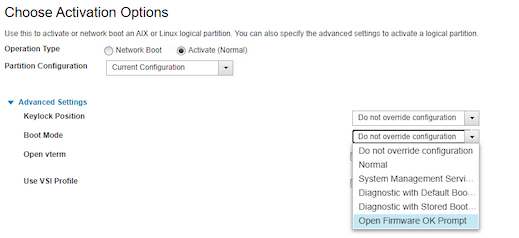
If you are using HMC, power off the LPAR and turn it back on. During activation, expand the “Advanced settings” option and select “Open Firmware OK Prompt.”
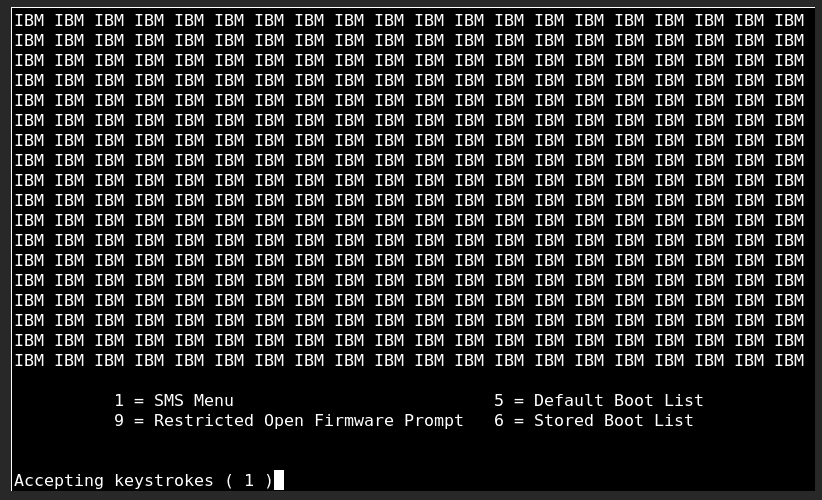
If you are using IBM Cloud, you must restart the LPAR, and when the boot screen appears, press the 9 key to select 9 (Restricted Open Firmware prompt).
Open Firmware is a powerful environment with various of low-level commands, but since you are in “rescue mode,” you only need to focus on triggering the verbose flag. Execute the appropriate architecture command based on your hardware generation to force AIX to speak.
For Power8 use:
boot -s verboseFor Power9 and newer use:
BOOT_FROM_SEQ -s verboseWhen you press Enter, the magic will begin.
The system will start booting up, displaying a lot of information.
For example, an AIX system that hung during startup at the following stage:
--------------------------------------------------------------------------
                                Welcome to AIX.
                   boot image timestamp: 04:48:45 11/22/2025
                 The current time and date: 17:14:49 07/12/2026
        processor count: 1;  memory size: 4096MB;  kernel size: 59712096
       boot device: /vdevice/vfc-client@30000004/disk@5005076810251e68:2
--------------------------------------------------------------------------
The reference code displayed was literally “Starting kernel”.
At that moment, it was impossible to determine what was wrong. The system wouldn’t boot, the disks and resources were perfectly fine, and there were zero error messages—absolutely nothing that would give you a clue or a shred of hope to find the root cause of the problem.
However, after booting the LPAR into verbose mode, the system finally exposed the exact location where the initialization process had stalled:
...
...
7 .bss 0 38ee780 3861880 2
free space between BSS and RAM filesystem: 0685A000

entry_point: 0x001001A0
kernel debugger setting: enabled
-------------------------------------------------------------------------------
LED{814}
This information “LED{814}” did not appear anywhere else.
Summary
When an LPAR goes completely dark, the Open Firmware verbose mode is often your last line of defense. It cuts through the guesswork, uncovers hidden error states and provides a definitive roadmap for recovery. Even if the logs don’t give you an immediate fix, attaching them to an IBM Support ticket dramatically slashes troubleshooting loops and accelerates corporate escalation.