
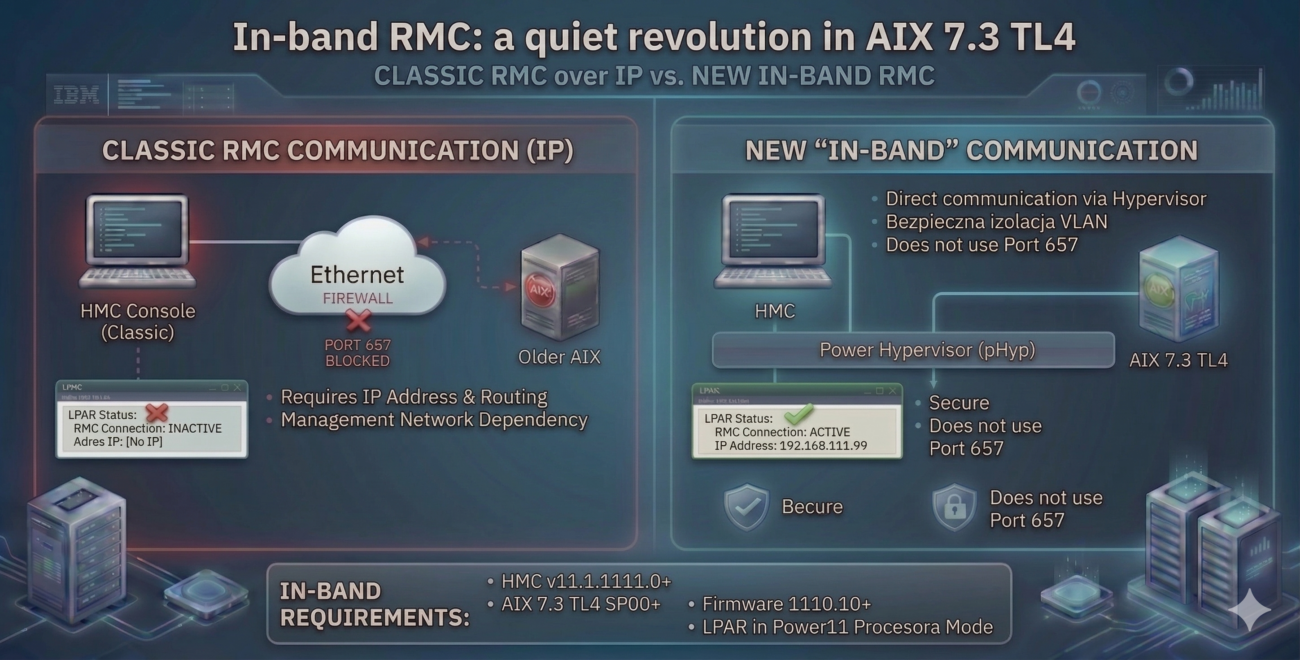
If you’ve spent any time managing IBM Power environments, you know the drill: you deploy a new LPAR in an isolated VLAN, and… nothing. The HMC can’t see it. You end up chasing network admins for firewall rules or wrestling with routing just to get port 657 open. For years, RMC was chained to the IP stack. Until now.
With AIX 7.3 TL4, IBM finally delivered something we’ve been asking for: in-band RMC. Instead of relying on the external network, the HMC now talks to the OS directly through the Power Hypervisor (pHyp).
The Old Way: No IP, No Game
Historically, RMC lived and died by the IP connection. If your LPAR lacked an IP address, had a routing hiccup, or hit a restrictive firewall, your RMC status went “Inactive.” This meant no DLPAR operations, no stats, and a lot of manual troubleshooting. A quick look at the rsct subsystem usually told the same old story:
# lssrc -g rsct

Subsystem        Group            PID          Status
ctrmc            rsct             13173142     active
ctcas            rsct                          inoperative
The New Reality: The “Intercom” Approach
The shift in AIX 7.3 TL4 is a massive quality-of-life upgrade. Think of it this way: instead of calling someone over the public mobile network (IP), you’re now using the building’s internal intercom (Hypervisor). It’s direct, internal, and bypasses the noise.
The first clue that you’re running the new tech is a new face in the rsct group: mcproxy.
# lssrc -g rsct

Subsystem         Group           PID          Status
ctrmc            rsct             10813776     active
mcproxy          rsct             14483948     active
ctcas            rsct                          inoperative
Why This Matters in the Data Center
- Rock-solid Connectivity: You can stop worrying about whether the HMC can “reach” the LPAR. Since communication happens at the Hypervisor level, it’s immune to IP network drops or misconfigurations.
- Smart Automation: The system always picks the best available path. You don’t need any additional switches or manual setup—if the infrastructure allows for In-band mode, AIX just uses it. If not, it gracefully falls back to classic IP.
- Hardened Security: By pulling management traffic off the public network, you’re effectively shrinking your attack surface. Your Security team is going to love this.
The “Zero-Touch” Factor: Don’t bother looking for a “In-band ON/OFF” toggle in the menu—there isn’t one. And honestly, that’s the best part. You don’t have to manage it manually. The OS negotiates the connection on its own: if the environment meets all the requirements, it’ll switch to the modern Hypervisor channel automatically. If something is missing (like older Firmware), it just falls back to the legacy IP configuration without skipping a beat.
Technical Requirements (Check Fix Central for “inband RMC”):
- HMC: v11.1.1111.0
- AIX: 7.3 TL4 SP00
- Firmware: 1110.10
- Processor Mode: Power11
Checking Status on AIX
To check whether you are using the ‘new pipe’, run the following command: lssrc -ls mcproxy. If you see an active session table containing your HMC names, you’re all set.
#  lssrc -ls mcproxy

Subsystem         Group            PID          Status
mcproxy          rsct             14483948     active

HMC Status Information:
+-----+---------------+------------+------------+--------------+
| SLOT| HMC NAME      |   STATUS   | ACTIVE REQ | PENDING RESP |
+-----+---------------+------------+------------+--------------+
|  11 |hmc1lab        |     A      |           1|             1|
|  12 |hmc2lab        |     A      |           1|             1|
+-----+---------------+------------+------------+--------------+
|TOTAL|       2       |  H: 0 A: 2 |           2|             2|
+-----+---------------+------------+------------+--------------+

**(H => Handshake State, A => Active State)
If you see a table like the one below, communication is proceeding “as usual”:
#  lssrc -ls mcproxy

Subsystem         Group            PID          Status
mcproxy          rsct             11469162     active

HMC Status Information:

+-----+---------------+------------+------------+--------------+
| SLOT| HMC NAME      |   STATUS   | ACTIVE REQ | PENDING RESP |
+-----+---------------+------------+------------+--------------+
|     |               |            |            |              |
+-----+---------------+------------+------------+--------------+
|TOTAL|       0       |  H: 0 A: 0 |           0|             0|
+-----+---------------+------------+------------+--------------+

**(H => Handshake State, A => Active State)
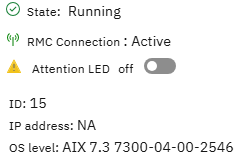
On the HMC side, you’ll see the RMC connection status as active, but—interestingly—without an associated IP address. It’s clean, it’s fast, and it just works.