

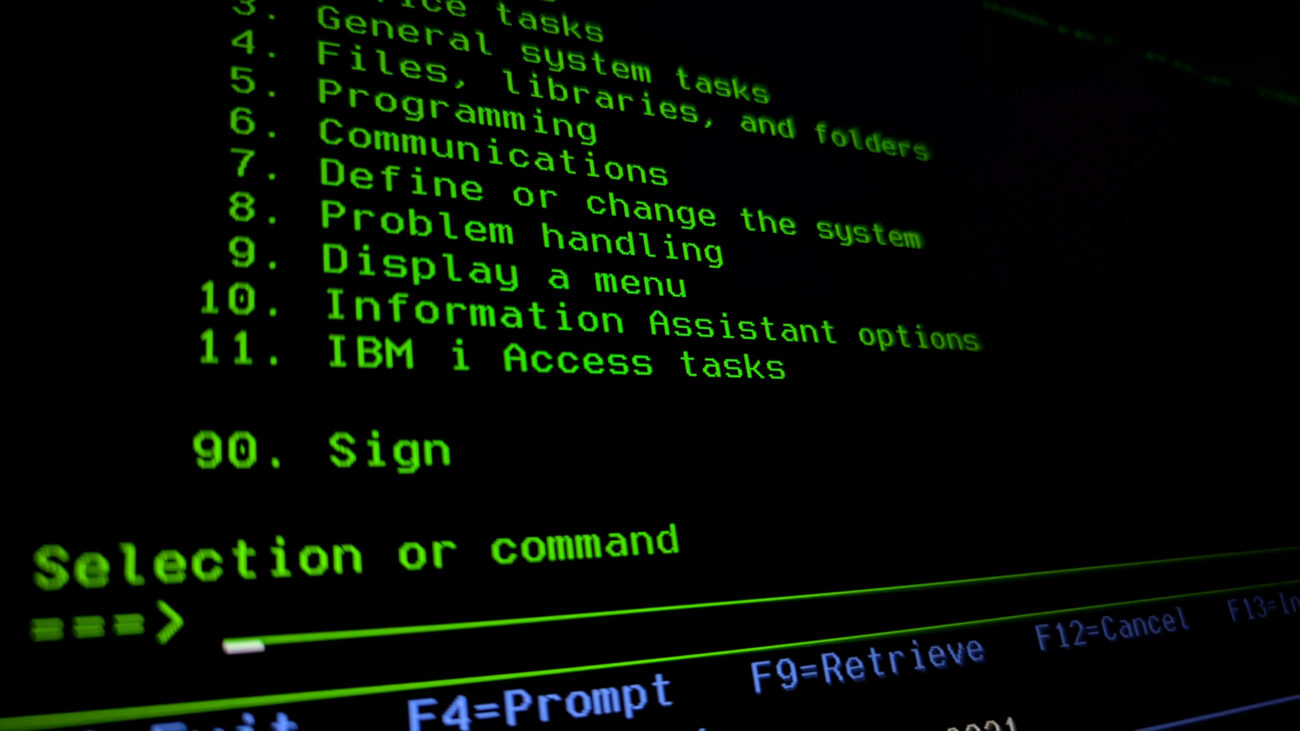
Today, I wanted to show you one of the most fascinating and surprising operating systems ever created. It’s not another Unix, Linux, or Windows. It is an architecture that went its own way and proved that systems engineering design can look completely different.
I’m talking about IBM’s child, which for many might be synonymous with “boring banking systems,” but in reality, is one of the most uncompromising projects in IT history. While we get excited about abstraction and virtualization today, thinking we are discovering new lands, this system was doing it decades ago. Imagine a system that doesn’t know the concept of a “file” in the way we understand it. A system where everything is an object, and all disk and operational memory form one vast, flat space. If you are looking for proof that true engineering doesn’t need buzzwords to blow you away, I invite you to read on.
The Birth of AS/400 (IBM i)
To understand this phenomenon, we must go back to the 1980s and transport ourselves to the IBM laboratory in Rochester, Minnesota. This is where the project codenamed “Silver Lake” was born. Engineers faced the breakneck task of merging two different worlds. On one side, we had the System/38. It was a machine ahead of its time, already boasting an integrated relational database and innovative memory management, but it was expensive and difficult to use. On the other side was the incredibly popular System/36, prized for its simplicity and intuitive interface, though architecturally much simpler.
The goal of the Silver Lake project was to create a platform that adopted the technological power of the System/38 and clothed it in the user-friendliness of the System/36. The result of this work was the premiere of the AS/400 (Application System/400) platform in June 1988. It should be noted that AS/400 refers to the hardware/platform, while OS/400 was the dedicated operating system. The architecture designed by Dr. Frank Soltis was not just a compromise, but a technological leap. A key assumption was protecting client investment in software. Thanks to the TIMI (Technology Independent Machine Interface) abstraction layer, companies could migrate their applications from older systems to the new platform without rewriting code from scratch. This approach defined the system’s identity for decades to come. Although the marketing name changed many times—from AS/400, through iSeries, System i, to the current IBM i—the foundation poured by Soltis in Rochester remained intact. It is this continuity that allows a program written in 1990 to run natively on a server produced this year. The AS/400 hardware no longer exists, but the operating system remains and runs on the IBM Power platform.
A Database Operating System
In the software world, we are used to a clear division. We have the operating system managing hardware and applications running on top of it. In a typical Windows or Linux environment, a database like Oracle or SQL Server is just another program that needs to be bought, installed, and maintained separately. In the case of IBM i, the situation is completely different, and this aspect constitutes the absolute uniqueness of this platform. Here, the relational database Db2 for i is not an overlay. It is built directly into the system kernel, below the machine interface level.
This architecture makes the operating system and the database an inseparable unity. The OS does not treat a data table like an ordinary stream of bytes on a disk whose content is indifferent to it. The operating system perfectly “understands” the structure of business data and treats an SQL table like any other native system object. Thanks to this, mechanisms such as authorization, space management, or record locking are handled at the lowest, most efficient kernel level, not by an external application fighting for CPU resources. This approach eliminates communication overhead and has made the platform dominant in OLTP (Online Transaction Processing) for decades.
The Object Nature of the System
The philosophy of this system stands in opposition to the Unix approach of treating everything as a file. In IBM i, the fundamental unit is the object. Whether we are talking about a program (*PGM), a data file (*FILE), or a user profile (*USRPRF), every resource has a strictly defined structure with a header and a functional part. Such a construction drastically raises the level of security through the mechanism of encapsulation. The system simply will not allow you to edit a compiled program in a text editor or execute code that has not been correctly processed. Access to the interior of an object is possible only through interfaces and commands defined by the system. Thanks to this, viruses or malicious scripts trying to overwrite executable code hit a wall at the system level.
Hardware Abstraction and Code Longevity
Another pillar of the architecture is the TIMI (Technology Independent Machine Interface) layer. Applications written for this system do not communicate directly with the processor but with a virtual layer. Only lower down does the SLIC layer (equivalent to the kernel and drivers) translate these instructions into machine code for the specific hardware.
This solution, brilliant in its simplicity, ensures unprecedented backward compatibility. A program compiled twenty years ago on a processor with a completely different architecture will work today on the latest POWER11 processor without recompilation. The system will automatically translate the instructions.
Single Level Storage
The unique approach to the database goes hand in hand with innovative memory management known as Single Level Storage (SLS). Dr. Frank Soltis pointed to this architecture as the key factor deciding the legendary performance of this platform. It is not a simple paging mechanism, but a total change in mindset that distinguishes this system from the competition. In this environment, an engineer does not have to worry about disk partitioning, drive letters, or mount points, because these concepts simply do not exist here. The system treats all available RAM and all hard drives as one gigantic, flat address space.
For the processor, an object residing on the disk is available at a specific address in virtual memory, exactly like data in RAM. It is the operating system that decides where to physically place a fragment of a file and when to move it to operational memory, based on access frequency. The administrator sees only storage pools (ASP), and micromanagement of disk sectors ceases to be their problem. This allows for I/O optimization at a level unattainable for classic file systems, realizing Soltis’s vision of blurring the line between volatile and persistent memory.
Disk Pools (ASP)
The concept of Single Level Storage, in which the system sees all disks as one vast address space, is a brilliant simplification for the programmer. However, infrastructure administrators sometimes need to physically separate certain groups of data, whether for performance or security. The mechanism that allows this, while maintaining the advantages of unified addressing, is the Auxiliary Storage Pool (ASP).
Every IBM i server has at least one pool, called the System ASP or ASP 1. This is the absolute heart of the machine. The operating system, licensed internal code, and all user data that hasn’t been intentionally moved elsewhere reside here. Within this pool, one specific disk plays a special role—the so-called Load Source, from which the machine reads microcode during startup.
Additionally, the system administrator can create so-called User ASPs, numbered from 2 to 32. This allows for physical isolation of data. For example, an administrator can build ASP #2 from very fast SSDs and direct intensive database logs there so they don’t slow down the rest of the system, while rarely used archives can be moved to cheaper spinning disks in a separate pool.
The system offers yet another space management capability known as IASP (Independent ASP), numbered from 33 to 255. Unlike basic pools, IASPs are not permanently “welded” to the operating system. They are self-contained data containers that can be logically attached or detached from the server at any moment without a restart. This technology is the foundation of modern High Availability (PowerHA) solutions. In the event of a main server failure, the IASP with the entire database is simply detached from the damaged machine and reattached to the backup server.
Hardware Foundation
All the mechanisms described above, from the integrated database to Single Level Storage, do not exist in a vacuum. Their operation is possible thanks to the connection with the IBM Power hardware platform. These are powerful machines utilizing the POWER processor architecture (ppc64), designed for extreme performance. These units offer multithreading at the SMT8 level, meaning one physical core handles eight threads simultaneously. The whole thing is managed by the built-in firmware hypervisor PowerVM, which allows dividing the physical server into Logical Partitions (LPAR), isolating operating systems from one another via the HMC console.
Here we reach a point that is simultaneously the platform’s greatest advantage and heaviest burden. Due to such deep integration with dedicated and expensive hardware, IBM i is an “elite” system, in the less positive sense. A mere mortal, computer science student, or enthusiast has no chance to “touch” this system in the comfort of their home. You cannot download an ISO image from the internet, install it on a virtual machine in VirtualBox, or run it on your laptop. The barrier to entry is set at the price level of an IBM Power server, which effectively cuts off the supply of “fresh blood” and makes knowledge of this fascinating architecture passed down almost like guild knowledge, only within large organizations.
The 5250 Terminal (Green Screens)
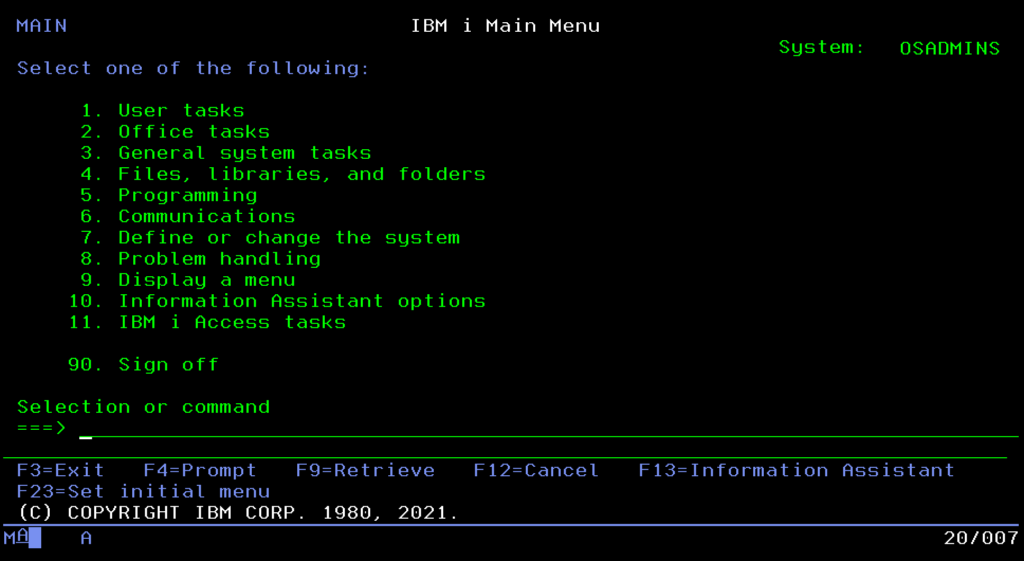
Since we already know the system is powerful and understand its foundations, we must face its “visual” calling card, which also continues to surprise, the famous “Green Screen.” Although to outsiders it looks like a relic of the past, for administrators, the text-based 5250 interface remains a model of ergonomics and speed. Here, time isn’t wasted looking for icons with a mouse, because work is based on muscle memory and a few key shortcuts.
The F1 key is not a dummy known from Windows, but powerful context-sensitive help that can explain every error. F3 and F12 serve for navigation, with the former definitively closing a program and the latter allowing a safe step back.
The greatest magic, however, is the F4 key. It is a brilliant prompt mechanism that means you don’t have to remember complicated command syntax. Just type the command and press F4, and the system itself will display a form to fill in parameters. Thanks to this, work in the terminal is lightning fast, and in case you get lost, the GO MAIN command will always safely throw us back to the main menu.
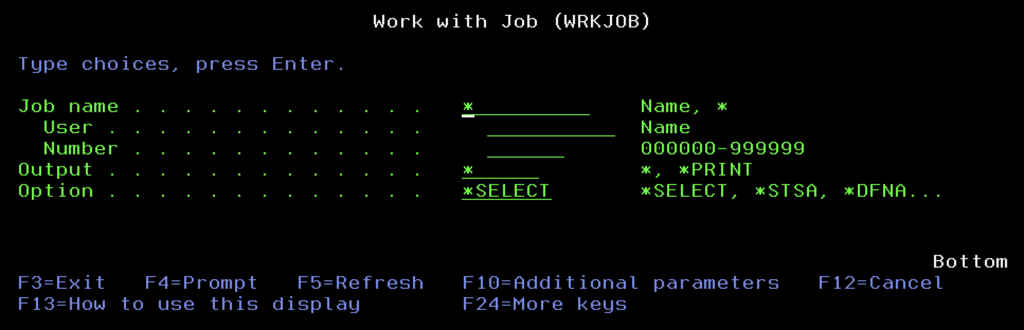
Finally, we have the function keys above F12; their use always brings a smile to people who haven’t seen the system before. They wonder how to use F14 on a PC keyboard. The matter is simple: we do it with the SHIFT key, so SHIFT+F2 becomes F14. Everyone visualizes this differently to efficiently hit the F-keys above F12; one method is to imagine a clock face where 2 o’clock is 14:00, and it’s the same on our keyboard. The use of these high F-keys results from the historical construction of the 5250 terminal keyboard, which actually had two rows of such keys.
Navigator for i: The Web Interface
IBM i does not ignore modern standards, however. The IBM Navigator for i console, accessible via a browser, is a key complement to the terminal, though it rarely manages to replace it entirely. Administrators reach for it in specific scenarios where a graphical interface has a natural advantage over text. The visual nature of Navigator is perfect for intuitive file management, network configuration, or graphical viewing of active jobs.
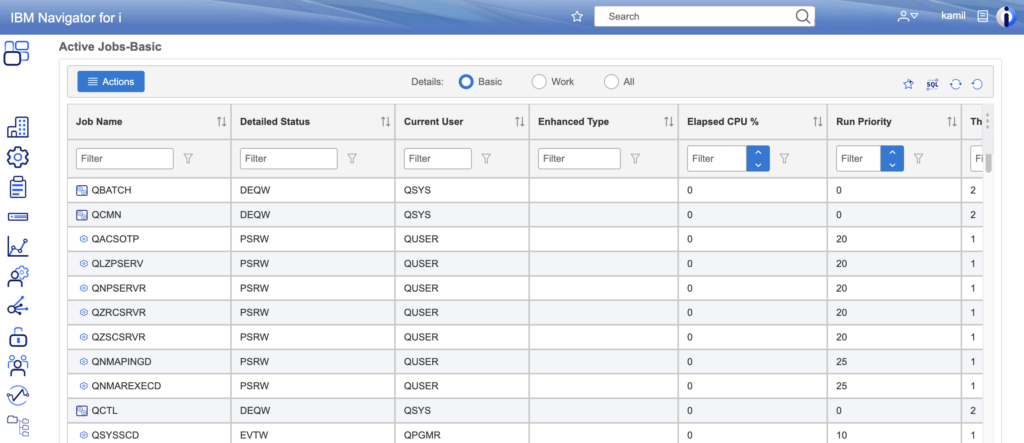
The true jewel in the crown of this tool, however, is PDI (Performance Data Investigator). It is a powerful module that turns raw system data into a readable story about the machine’s state. Instead of analyzing endless columns of numbers, the administrator receives interactive charts of CPU, memory, or disk usage over time, allowing for the pinpointing of application bottlenecks with surgical precision, often impossible to achieve with traditional log browsing.
Control Language (CL)
Since we have loaded into the system, we must learn the language in which commands are issued. In the IBM i world, this is not a jumble of random abbreviations, but a thoughtful engineering construction called Control Language (CL). It is more than a system shell; it is the glue connecting the administrator with the system.
The strength of CL lies in its brilliant, almost grammatical syntax based on the Verb-Noun scheme. Unlike Unix systems where commands can be cryptographic puzzles (like ls, grep, or awk), here command names are logical sentences shortened to three letters. If you want to work with something, you use the prefix WRK (Work with). If you want to create something, you write CRT (Create), and when you want to delete it, DLT (Delete). Displaying is DSP (Display), and changing is CHG (Change).

This predictability means that even without knowing the exact name of a command, you can deduce it. Want to manage active jobs? You combine “work” (WRK), “active” (ACT), and “jobs” (JOB), receiving one of the most used commands: WRKACTJOB. Want to create a user profile? CRTUSRPRF. Delete a file? DLTF. It’s a logical puzzle that drastically shortens the learning curve. Moreover, these commands don’t have to be typed manually every time. They can be encapsulated in CL programs (*PGM of type CLP or CLLE). These serve to automate repetitive processes, set the appropriate library list (LIBL) before running an application, or control data flow between modules.
System Values
At the very top of the management ladder, above ordinary commands, stands the “constitution” of the entire machine. These are System Values (global parameters), a kind of digital DNA that defines the behavior of the operating system at the lowest level. They are not edited in text files but managed centrally via the WRKSYSVAL command. This is where decisions about fundamental security issues and the server’s work culture are made.
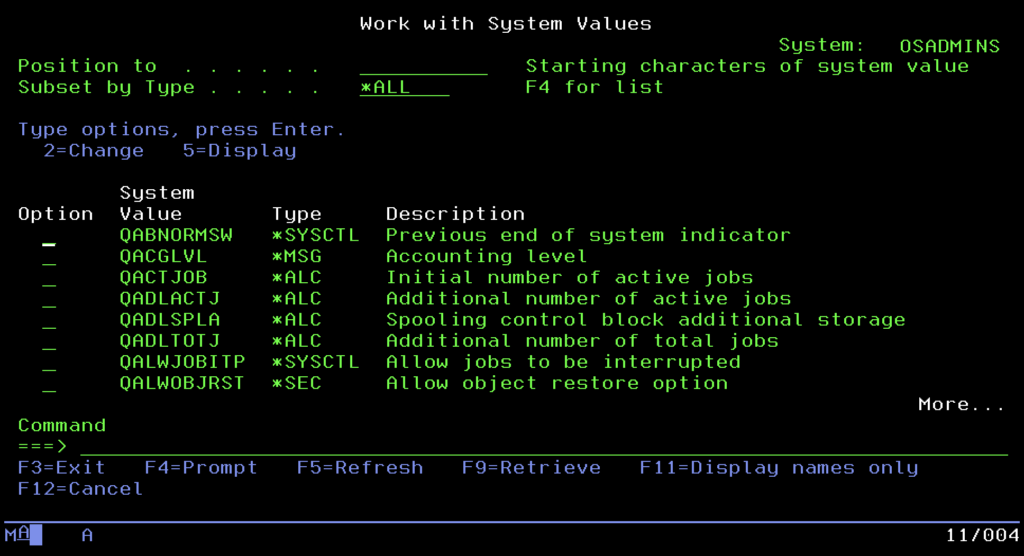
Administrators treat the QSECURITY value with special attention, as it decides whether the system is an open fortress or a secure bunker meeting rigorous banking standards (level 40 or 50 – Integrity Protection). Equally important is the QPWDVLDPGM parameter, allowing the attachment of an external program validating passwords and enforcing complexity policies, or the prosaic QDATFMT, setting the date format. It is also worth mentioning QSTRUPPGM, a key value indicating the program that is to launch automatically after system startup. This is where it is defined which subsystems, databases, and application servers are to launch with the machine, allowing for full automation of the boot sequence of the entire environment.
Structure of Objects and Libraries
To fully understand how this system organizes reality, we must briefly forget the thicket of infinitely nested folders that Windows or Linux have accustomed us to. The native world of IBM i bets on a rigorous, almost flat hierarchy that enforces unusual discipline on administrators and programmers.
At the top of this structure stands the absolute ruler, the system library QSYS. It is a kind of “mother” of all resources and, at the same time, the only exception to the rule I will explain in a moment. QSYS is the root of the system and stores key machine control elements inside: user profiles, device definitions, and most importantly, all other libraries.
And here we come to the iron rule of IBM i architecture: a regular library (marked with type *LIB) cannot contain another library. Forget about creating complicated directory trees like “2024/January/Invoices.” Aside from the unique case of QSYS containing other libraries, the structure is always single-level. A user library is a logical container, a bag for objects (programs and data), which lies directly under QSYS but cannot itself have “children” in the form of further libraries.
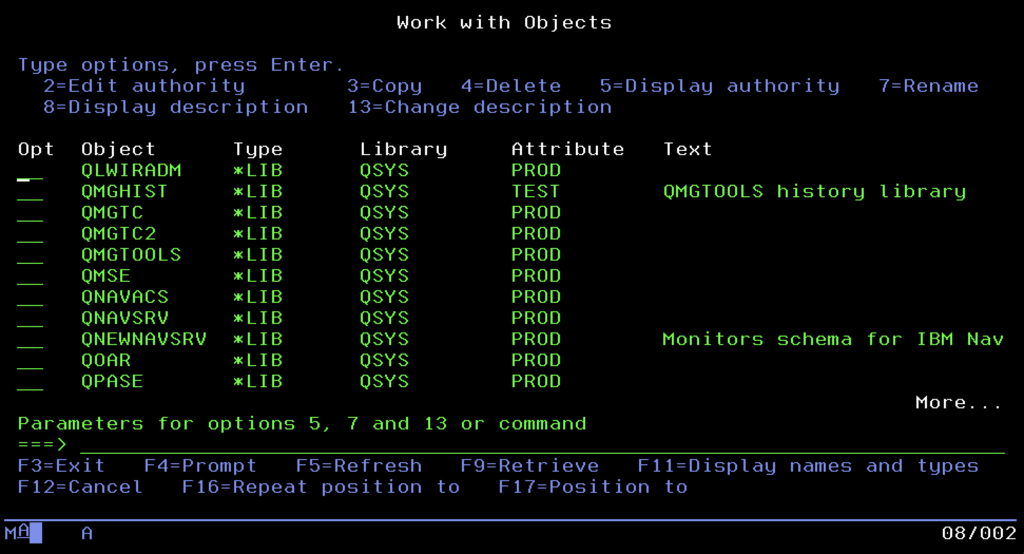
Alongside areas created by us for applications, containers provided by IBM are always present in the system, such as QGPL (General Purpose Library) for storing temporary and general objects, or QUSRSYS, storing information specific to the configuration of a given server.
This specific, “flat” architecture determines the way we refer to data. Addressing here is extremely elegant in its simplicity and relies on the LIBRARY/OBJECT scheme. So if you are looking for a specific table with invoices in your application, the system doesn’t make you wander through long access paths but leads straight to the goal with an address in the format MYAPP/INVOICES. Such a model makes finding any resource in the system lightning fast, and a mess, provided we stick to the rules, difficult to create.
Library List (*LIBL)
Since we already know how to address objects, a natural question arises: do we have to provide their full, rigid path in the LIBRARY/OBJECT format every time? That would be tedious and inflexible. Here enters the stage the Library List, known as *LIBL.
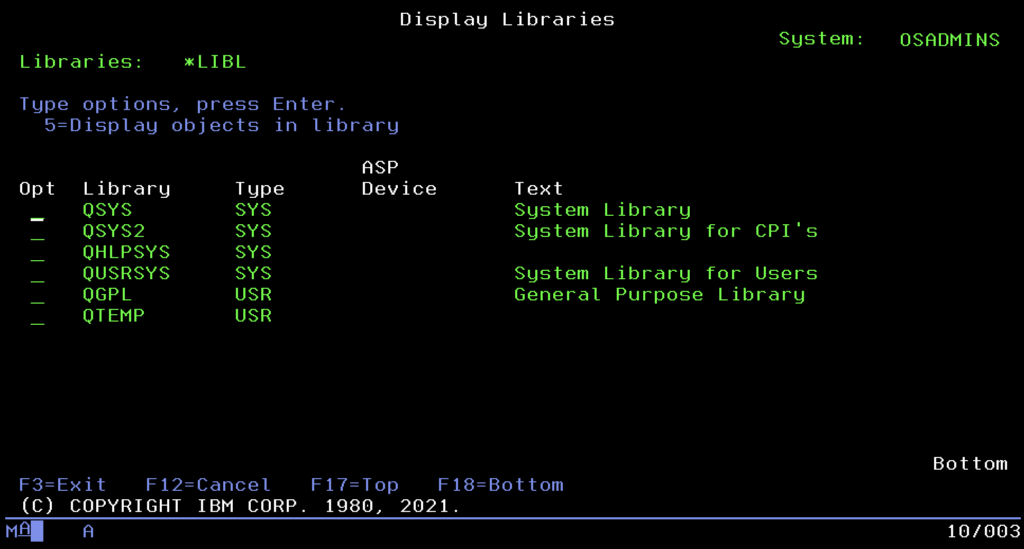
You can think of it as a much more advanced equivalent of the %PATH% variable from Windows or $PATH from Unix systems. It is an ordered list of places the system searches automatically when we call a program or open a file without indicating its specific address. Order is key here. The system always begins the search from the system part (where IBM tools are), then looks into the so-called Current Library, and finally scans the user part, where our applications reside.
For example, in the software development process: Imagine a situation where a programmer must test a new version of the CALC program. Instead of modifying code or copying files, they simply modify their library list, placing the test library TESTLIB before the production PRODLIB. Now, when they call the command CALC, the system will “grab” the first version encountered, the test one. The rest of the company, working on the standard list, will still use the production version. This allows for collision-free testing of changes on a living organism without physically swapping executable files.
Finally, the QTEMP library is a unique IBM solution for working data, isolating processes by creating a unique instance of the library for each logged-in user or job. Thanks to this, users can safely create temporary tables, files, and experimental data copies without fearing conflicts with others. The biggest advantage of QTEMP is automatic cleaning: the library and its contents disappear immediately after the session or job ends, eliminating the need to manually delete temporary files. The system takes care of “work hygiene,” ensuring that after leaving the “office,” your “desk” is always clean.
Db2 for i: The Heart of the System
We finally reach the element that defines the identity of the entire platform and constitutes its uniqueness against market competition. In the Windows or Linux world, we are used to the database being just another application that needs to be bought, installed, and configured on top of the operating system. In IBM i, the situation is completely different: here, the database is not an overlay but an integral part of the Licensed Internal Code (LIC). Db2 for i is inextricably linked to the system kernel, meaning it cannot be turned off or uninstalled. It is the natural living environment for all data, using the same memory management and security mechanisms as the operating system itself.
To understand this phenomenon, we must look at the evolution of data description methods. For decades, before SQL became the universal standard, DDS (Data Description Specifications) reigned supreme in the IBM i world. It is worth explaining a fundamental difference here: DDS is not a query language used to “talk” to the database like we do today with the SELECT statement. It is a raw, positional structure definition language, a kind of architectural blueprint. A programmer didn’t write queries but, in rigid source code columns, painstakingly defined that from the first to the tenth byte lies the “Surname,” and the next four bytes are the “Date.” Then, such a file had to be compiled so the system could create an object on the disk.
In this way, two types of entities were created: Physical Files (PF), which are the actual containers storing data (equivalent to tables), and Logical Files (LF). The latter played the role of clever overlays; they contained no data, only instructions (indexes) on how to sort or filter data from the physical file. It was an extremely efficient solution, but hermetic and requiring specific knowledge available only to engineers of this single platform.
The modern world, however, belongs to SQL. Why does it dominate now? Because it is flexible, dynamic, and understandable to every IT specialist in the world, allowing structures to be created and modified “on the fly” without a tedious compilation process. However, the genius of the Rochester engineers lay in the fact that they did not replace the old with the new, but made both worlds identical. An SQL table created today with a modern CREATE TABLE script is, underneath, simply a Physical File for the system, and a view or index is nothing more than a Logical File. Thanks to this two-way compatibility, a 30-year-old accounting program written in RPG, based on old DDS, can natively work on the same tables used by a modern Java web application.
This duality also applies to the method of accessing information. Traditional applications often use the so-called Native I/O, or record-level access, which allows the programmer to retrieve data row by row with surgical precision. This method is incredibly fast in specific transactional applications. On the other hand, the modern approach is based on the SQL engine and its optimizer (SQE), which, thanks to advanced statistics, decides itself how to retrieve the requested data set fastest. In IBM i, both these mechanisms work side by side, giving programmers a choice of weapons: the precise scalpel of Native I/O or the heavy artillery of SQL.
Overseeing the safety of all this is the Journaling mechanism, serving as the system’s “black box.” Every data change operation, insertion, update, or deletion of a record, is first written to the journal and its receiver, and only then physically hits the table. This solution performs two critical functions. First, it enables transaction handling (Commitment Control), guaranteeing that complicated financial operations execute entirely or not at all. Second, it ensures reliable data Recovery. If the power suddenly goes out in the server room, the system will automatically reach into the journal after a restart and replay all changes that were in memory but hadn’t managed to save to the disk, making data loss an extremely rare phenomenon.
Finally, it is worth clearly distinguishing Db2 for i from its namesake on other platforms, i.e., Db2 LUW (Linux, Unix, Windows). These are not the same products. The version on IBM i is an “administration-free” database. Thanks to the Single Level Storage architecture, the administrator does not have to manage table files, disk spaces, or memory buffers here, as is the case in Oracle or SQL Server. The database simply “is,” automatically stretching across the entire available disk space, which relieves the administrator of the technicalities of tuning the database engine.
Work Management
So far, we have focused on the static structure: objects, libraries, and the database. However, we cannot forget what gave the platform its original name AS/400, meaning Application System. It is not just a database; it is primarily a powerful application server. Because the Db2 database resides right next to the kernel, business applications run with unprecedented speed, but this power requires control. The mechanisms we are about to discuss serve precisely to ensure perfect order in the system, and that CPU and memory resources go where they are needed most.
The basic unit of life in this system is the Job. Every activity, from a user logging in to nightly warehouse recalculations, is a Job. You can think of it like a process known from Unix systems (possessing a PID), but here the identification is more “human.” Every Job has a unique, three-part signature in the format: Number/User/Name. Thanks to this, an administrator seeing the string 123456/QUSER/QZDASOINIT immediately knows who and what launched it, without having to map mysterious PID numbers to service names.
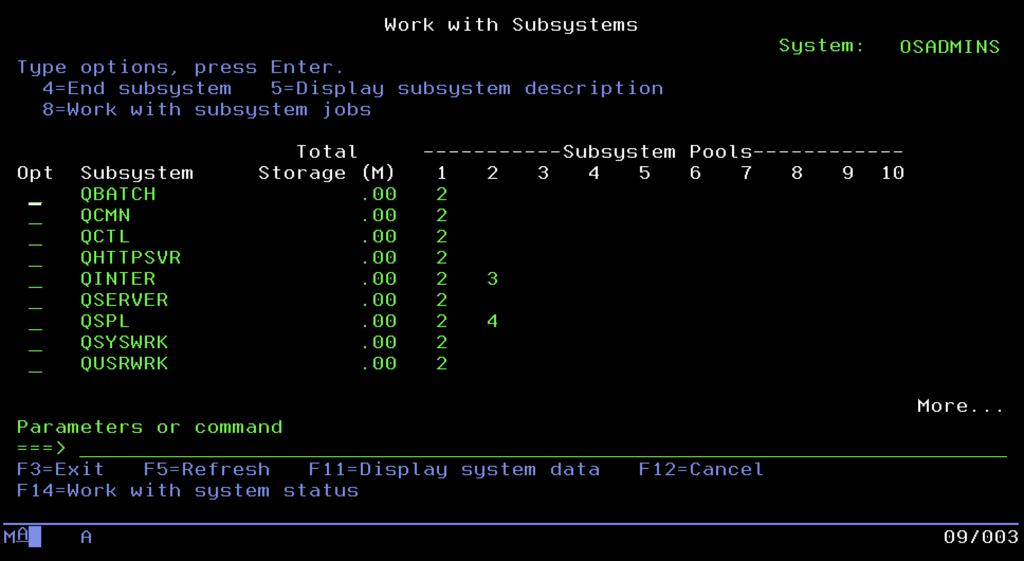
The world of tasks is divided into two main spheres. The first is Interactive, meaning sessions of users working on 5250 terminals, requiring immediate reaction. The second is Batch, powerful batch processing processes that crunch data in the background, usually at night, without requiring human interaction. To keep these two worlds from getting in each other’s way, and to prevent one user generating a report from blocking the work of the entire office, IBM engineers invented Subsystems. These are virtual containers, separated zones of memory and processor, in which tasks are run. Typically, interactive users go to the QINTER subsystem, where reaction time is the priority, while heavy background tasks land in QBATCH, where they are queued and processed one by one. The whole thing is usually overseen by the controlling subsystem QCTL, which is the operational brain of the machine.
A unique feature of IBM i is also the way the system “talks” to its surroundings, known as Message Handling. Unlike Linux, Unix, or Windows systems, which simply throw errors into text logs and “die,” this system conducts a dialogue and sends you information in such a situation. Communication takes place via Message Queues (*MSGQ). The most important of these is QSYSOPR (the main operator console). This is where information about disk failures or backup problems goes.
The most interesting part, however, is the mechanism for interaction with application errors. Imagine a situation where an accounting program encounters a problem, it could be a lack of paper in the printer, a locked record in the database, or a sudden lack of permissions to a specific object. Instead of shutting down (crash), as happens in most modern environments, the program on IBM i sends an Inquiry message and enters a specific state called MSGW (Message Wait). At this moment, the task freezes and waits. The system does not kill the process but patiently awaits the administrator’s decision.
This feature is extremely useful, practically a lifesaver in critical production environments. To appreciate the genius of this solution, imagine a nightly processing job that takes two hours. At the 119th minute, an error occurs. In the world of classic operating systems like Linux, Unix, or Windows, this usually means a definitive end. The process “dies,” and the administrator faces the tedious task of searching for the cause in logs (if the program was kind enough to leave them). After fixing the defect, they must start the task from scratch and wait another two hours “with their heart in their throat,” hoping that this time everything will end successfully.
In the case of IBM i, this scenario looks completely different. When the process enters the MSGW state, we get a clear message on the operator console: “No permissions to file X.” Time for this task stops. The administrator can calmly analyze the problem, grant the missing permissions “on the fly,” and then reply to the message with the Retry command. The system will resume processing exactly at the millisecond point where it was paused. Instead of two lost hours and a restart of the whole process, we have only a few minutes of operational pause. The MSGW state is a clear signal from the machine: “I am alive, I remember what I was doing, and I am waiting for your help to finish the work.”
Integrated File System and Open Source
A few moments ago, I tried to root out habits from the Windows and Linux world, repeating like a mantra that in IBM i “everything is an object,” and the concept of a file in the classic sense does not exist. And now, quite perversely, I have to do a U-turn and say: that is not entirely true. Welcome to the Integrated File System (IFS), the place where IBM i shakes hands with the rest of the IT world.
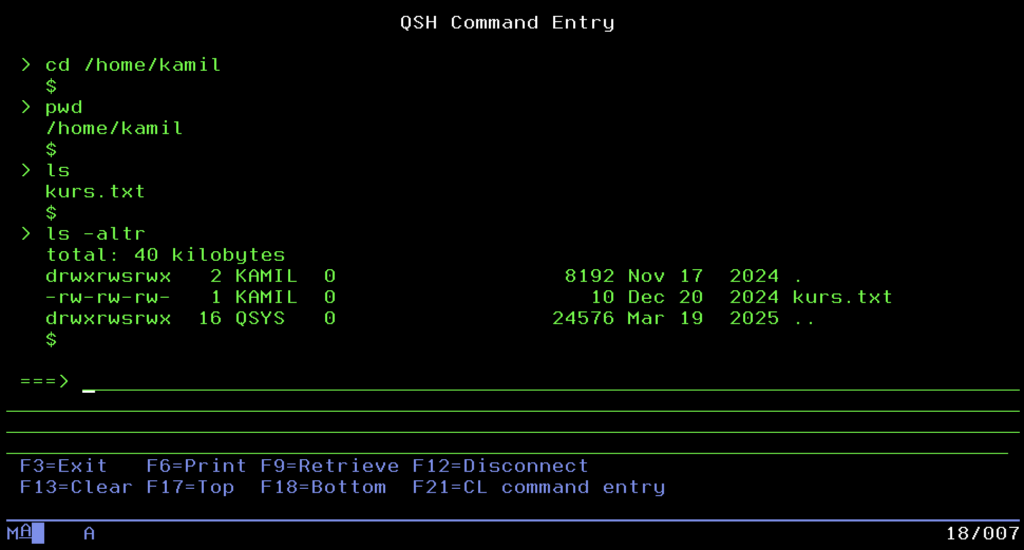
IBM engineers knew that isolation leads nowhere. For the system to communicate with the environment and support modern web technologies, it had to “learn” POSIX standards. Thus, IFS was born. It is nothing more than a mechanism built into the system that emulates the classic, tree-like directory structure we know from Unix or Windows. We start from the root directory (Root /) and go down, creating subfolders such as /home/user/document.txt.
It is here, and not in the hermetic libraries, that everything coming from the “new world” lands. If you want to run an application in Node.js, set up a WWW server serving HTML files, fire up PHP scripts, or store .jar files for the Java virtual machine, you will do it precisely in IFS. Moreover, for a PC user, this area is the friendliest part of the server. Thanks to support for the SMB protocol, IFS directories can be mapped in Windows as a regular network drive. You can drag and drop files onto a powerful enterprise server as if it were a regular flash drive, or connect to it via SFTP or even SSH clients.
The most interesting thing about all this, however, is the fact that IFS acts like a giant umbrella covering the entire machine. And here we get to the heart of integration: the “sacred” world of objects and libraries (QSYS.LIB) discussed earlier is not a separate entity. From the perspective of IFS, it is simply one of the subdirectories visible under the path /QSYS.LIB/. This is a brilliant abstraction that makes the file system one, but it has many faces, depending on whether we need a flat structure for fast transaction processing or a directory tree for serving a website.
PASE
Storing files alone is not enough, however, to attract modern developers. That is why IBM went a step further, creating PASE (Portable Application Solutions Environment). It is nothing more than a complete runtime environment for the AIX system (IBM’s Unix), running directly inside IBM i. It is not slow emulation; it is an operating system within an operating system, using the machine kernel directly.
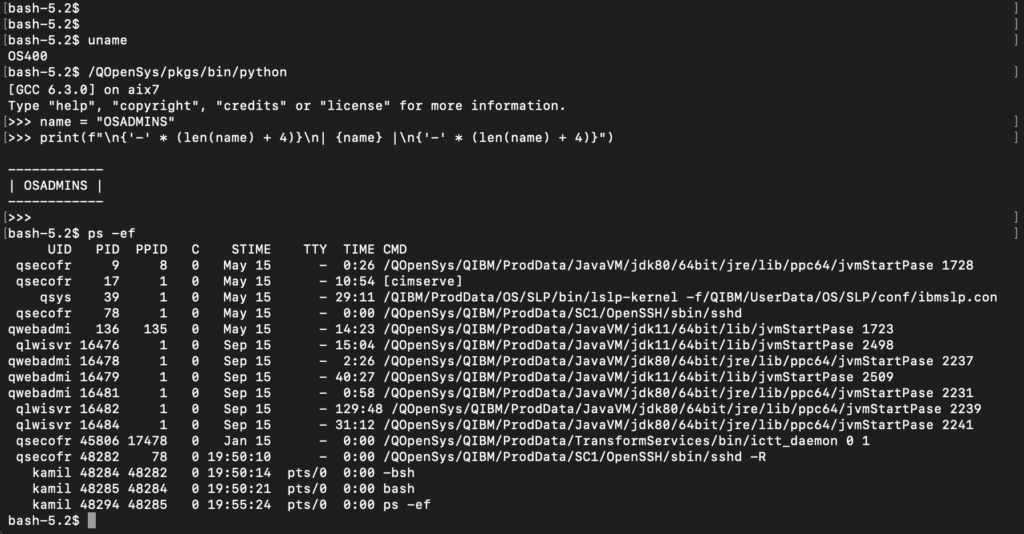
Thanks to PASE, the “green screen” gained new life. Administrators and programmers can run the Bash shell, use the Git version control system, write scripts in Python, or run servers in Node.js. What once seemed impossible on an “accounting” machine is standard today. Managing this inventory is done in a way familiar to every Linux user (Red Hat/CentOS), using the Yum package manager (managing RPM packages). This means that IBM i has become a hybrid platform in the full sense of the word: it can simultaneously process millions of banking transactions in old RPG and serve modern APIs, using the same data and resources.
Lifecycle Management and System Updates
Since we already have running applications, a database, and modern services, we must ensure the system endures. In the IBM i world, stability is not a matter of chance, but the result of order. Here, you don’t install random files downloaded from the internet. Everything that enters the system kernel must go through a formalized inventory process. The command center for this process is the menu available after typing the command GO LICPGM. It is not a magic spell; in the nomenclature of this system, GO simply means going to a menu, and LICPGM is short for Licensed Programs.
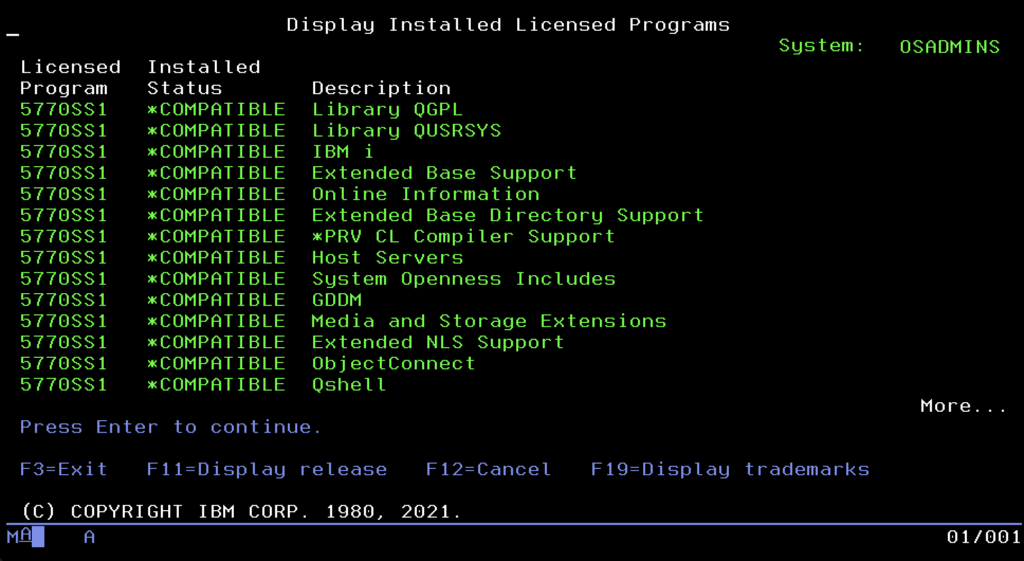
You can think of it as a system “app store” or “Add/Remove Programs” panel, just in a text version. Here, the administrator sees the software installed on the machine as formalized “products.” This menu leads the user by the hand: by selecting the appropriate options from the list, you can install new functions, remove unnecessary components to free up space, or display a list of owned licenses. It is an overlay that hides complicated installation commands from us, allowing us to manage server “equipment” in an orderly manner.
It is crucial to understand here what the system considers a “Licensed Program.” Although we will most often see products provided by IBM in this menu, this mechanism is also open to third-party companies. Professional software vendors (e.g., High Availability tools, ERP systems, or banking solutions) often package their applications in this same standard (LPP – Licensed Program Product). Thanks to this, their software becomes a full-fledged citizen of the system, appears on the official list of installed products, and can be installed and updated with the system command RSTLICPGM, instead of manually restoring libraries. Moreover, it is subject to the same system consistency verification as components provided by IBM. Many smaller applications are distributed in a simpler way (as ordinary libraries), so they are not visible in this menu, but “heavyweight” software usually uses the benefits of LICPGM.
This tool has one more brilliant function, acting like a car inspection. I am talking about the CHKPRDOPT (Check Product Option) option. It allows you to scan installed software (both IBM and that from external vendors, if properly packaged) and check its integrity. The system verifies if any file has been accidentally deleted or damaged. If the mechanism detects any irregularity in the directory structure or file checksums, it will inform you immediately. This gives the administrator confidence that everything is working “under the hood” even before the first problems with application operation appear.
However, even the best-managed system requires patching bugs. In the IBM i world, a patch is called a PTF (Program Temporary Fix). Although the name suggests “temporariness,” in reality, these are permanent code fixes. IBM does not make administrators install thousands of individual files, though. Fixes are grouped into packages. Once in a while, a Cumulative Package is released, a massive collection of all fixes, a kind of “Service Pack.” For specific areas, such as the database or HTTP server, there are smaller collections called Group PTF. Thanks to this, updating the system resembles replacing an entire module more than darning holes.
The true masterpiece of engineering, however, is the Technology Refresh (TR) mechanism. Previously, to get support for new hardware or new SQL functions, you had to do a full operating system upgrade to a higher version. TR changed these rules. These are large update packages that can “inject” new hardware drivers (e.g., for FC or ETH cards), modernize the query optimizer, or add new processor instructions into a running system without changing the system version number. Thanks to this, IBM i version 7.4, after installing the latest TR, can do things that no one even dreamed of on the day of its premiere.
Finally, it is worth knowing the system versioning. It is based on the V.R.M scheme (Version, Release, Modification), e.g., V7R5M0. New major releases appear less frequently than in the consumer world, usually every 2-3 years, but they live much longer. Each version has a standard support period of about 7 years. It is worth remembering, however, that software here is tightly coupled with hardware. New OS versions require appropriate computing power; for example, IBM i 7.5 requires servers based on POWER9 or POWER10 processors. This is a symbiosis that forces organizations into continuous, albeit slow and predictable, infrastructure development.
Users and Security
In the world of cybersecurity, where every day we hear about data leaks and ransomware attacks, IBM i enjoys the reputation of a digital fortress. This is not due to magic, but the fundamental architecture we have spoken about from the beginning. Because viruses and malware are usually written for systems operating on files, when colliding with the hermetic world of IBM i objects, they are often helpless because they simply do not know how to “infect” a database that is not a file. However, this natural resistance is only the first line of defense. True security begins with precise access control, the foundation of which is the User Profile.
In IBM i, a user account is something more than a login and password; it is a system object defining the digital identity of a human or process in the smallest detail. Managing these identities takes place in one place, accessible under the command WRKUSRPRF. You can think of this tool as a system HR panel, where the administrator sees a list of all persons having access to the machine. By entering profile editing, we do not edit a text file, but set object parameters, often using ready-made templates called User Classes. The most popular of them is the class *USER, intended for ordinary employees who see only their applications. Programmers usually receive the *PGMR class, giving access to compilers, while full power is held by the administrator with the *SECOFR class, meaning Security Officer.
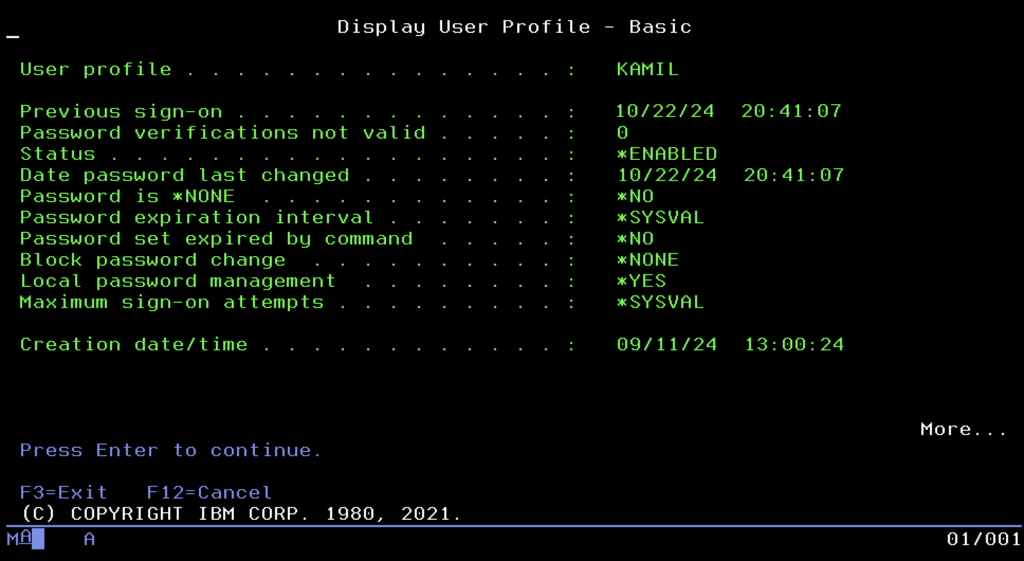
The user class is just an introduction, however, because true power in the system is defined by Special Authorities. These are specific “superpowers” that the administrator can grant to selected profiles. The most important and dangerous of them is *ALLOBJ (All Object), acting like a universal key to all doors. A user with this flag is the equivalent of “root” in Unix; they have unlimited access to absolutely every object in the system and can delete any database, even if the system theoretically forbids it. Another important permission is *JOBCTL (Job Control), giving power over the “factory,” meaning the ability to manage other people’s processes, and *SPLCTL (Spool Control), which allows viewing and deleting any employee’s printouts in the company, even confidential ones.
Beyond general permissions, the system allows for extremely precise authorization at the level of single objects. We can configure the environment so that one employee can only read data from a table, another can change it, and the rest of the company does not see its existence at all. Here we come to the most brilliant mechanism of this platform, called Adopted Authority. It solves the eternal problem: how to allow an accountant to work in the financial system without giving her the right to “dig” in the database, e.g., via Excel. Thanks to this mechanism, when the user launches the official accounting program, for the duration of its operation, the system “lends” her the permissions of the program owner. It works like a magic cloak; as long as she is inside the safe application, she has the power to edit the database. The moment she exits the program, the permissions disappear, and an attempt at direct access to the data ends in refusal.
At the very top of this pyramid of permissions stands one specific profile, delivered from the factory with the system, QSECOFR (Security Officer). This is the absolute ruler of the machine, the equivalent of the “root” account in Linux systems or “Administrator” in Windows, but with even deeper integration. QSECOFR possesses by default all possible special permissions, including *ALLOBJ, which means that for it, no prohibitions or blocks exist. It is this account that is used for the first configuration of the server, installation of the operating system, or saving the machine in critical situations. Due to its power, it is good practice for it to “lie in a safe” on a daily basis; administrators should work on their own named accounts and reach for QSECOFR only as a last resort. Losing the password to this profile is one of the few scenarios that can force a reinstallation of the entire system.
Backup and Restore
Even the best-secured fortress with the most rigorous access control is useless if it does not have a backup. In the IBM i world, the approach to backup is just as integrated as the rest of the system, relying on a strategy where data recoverability is the absolute priority. At the lowest level, the system offers a set of native commands that allow the administrator to “surgically” extract and save fragments of data. The basic tools here are commands starting with the prefix SAV, such as SAVLIB for libraries or SAVOBJ for single objects. What is extremely important is that every object in this system has its own “memory” of backups. If we inspect its description, we will find precise information there about the date of the last save and the identifier of the volume (tape) it went to. Thanks to this, the administrator, looking at the object itself, knows exactly where to look for its copy without having to dig through external registers.
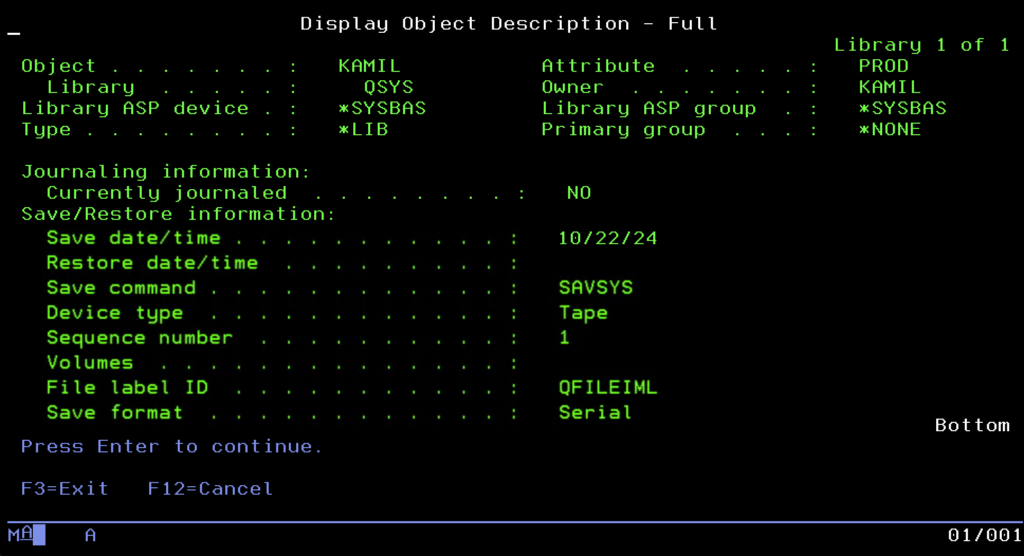
To facilitate work, IBM prepared ready-made scenarios available in the GO SAVE menu. The most famous item there is Option 21, the “nuclear button,” which performs a dump of absolutely everything. However, this menu also contains more precise options. Administrators can use options dedicated exclusively to saving system data (Option 22) or only user data (Option 23). This is key because a full system backup (Option 21) requires putting the machine into a Restricted State, which involves completely cutting off users and stopping applications. In large corporate environments operating in 24/7 mode, such a luxury of downtime can rarely be afforded. Therefore, on a daily basis, strategies allowing for “live” backup are used, utilizing the Save While Active mechanism, which guarantees data consistency even with open files, or copies are made on a backup server to which data is replicated in real-time.
Managing hundreds of tapes and a complicated schedule would be a nightmare using just simple commands, which is why the standard in professional environments is BRMS (Backup, Recovery and Media Services). This is not a simple overlay, but a powerful, full-fledged data lifecycle management system. In BRMS, the administrator does not think about individual commands but defines backup policies: what is to be stored, on what days, how many copies are to be created, and how long they are to be kept (retention). The system itself watches when a tape can be overwritten and when it must be protected from deletion. All this data physically goes to various media, from classic LTO tapes to virtual libraries (VTL). An interesting feature is also objects of type *SAVF (Save File), which allow making a backup to a file on disk, which works ideally when sending data between servers over a network.
Monitoring and Diagnostics
An IBM i administrator does not have to guess what is happening inside the machine; this system was designed to provide detailed telemetry data at every level of operation. The first place one looks to check the general condition of the server is the screen called up by the command WRKSYSSTS (Work with System Status). This is the system heart monitor. Although current processor usage is visible here, the eyes of an experienced engineer usually wander to two other places. First, to the % ASP Used indicator, i.e., the percentage of disk fullness. In the Single Level Storage architecture, crossing the 90% threshold can drastically affect performance, and total fullness will stop the machine. Second, the paging error indicator (Faults) in memory pools is analyzed, which allows assessing whether the system is choking from a lack of RAM and wasting time juggling data between the disk and operational memory.
If general indicators are normal but the system seems slow, we reach for the “magnifying glass,” i.e., the command WRKACTJOB (Work with Active Jobs). This is the equivalent of Task Manager, showing a list of all running processes. We can instantly sort tasks by CPU usage here to find the culprit “eating” resources. It is also here that we most quickly catch tasks with the status MSGW (Message Wait), processes that have stopped and are waiting for human intervention, for example, due to an error in the program or lack of paper in the printer.
When something goes wrong, the system usually informs about it loudly. The main communication channel is the QSYSOPR queue, where all critical events go, from hardware failures to requests to insert a new tape into the drive. However, if the problem concerns a specific application, the most valuable source of knowledge is the Job Log. Every task in the system keeps its own detailed log, which is a kind of black box. We will find a record of every command executed and every error in it, which constitutes the foundation of debugging and allows recreating the sequence of events leading to the failure.
It is worth noting, however, that IBM i is evolving, and with it, diagnostic methods. Although classic CL commands are still in use, the modern administrator increasingly reaches for IBM i Services. This is a brilliant concept that allows querying the operating system as if it were a database. Instead of typing WRKSYSSTS, one can execute an SQL query: SELECT * FROM QSYS2.SYSTEM_STATUS. This allows for the easy creation of custom reports, dashboards, or monitoring scripts that automatically notify us of problems using standard SQL language.
For those who must look back and analyze historical performance, the system offers powerful Performance Tools. Traditionalists can use the text menu GO PERFORM, but the true revolution is PDI (Performance Data Investigator), a graphical tool available in a web browser (in the IBM Navigator for i package). PDI can digest gigabytes of data collected by the system in the background and draw interactive charts, showing exactly what happened with the processor, disks, or memory a week ago at 2:00 PM, allowing for deep analysis of trends and bottlenecks.
Service Tools and IPL Process
When we go deeper and deeper into the IBM i architecture, we reach the layer that functions “under” the operating system. This is where raw hardware, disk array configuration, and internal machine code are managed. IBM provides two twin sets of tools for this purpose, differing in the moment they can be used. The first, used daily by administrators, is SST (System Service Tools). Accessible directly from the running system by typing the command STRSST, they allow looking into the machine’s “guts” without interrupting user work. This is where disk protection (RAID, mirroring) is configured or new units are added to the ASP pool. Here, key machine registers are also reviewed: PAL (Product Activity Log) with raw hardware errors, SAL (Service Action Log), which processes them into ready tasks for service, and LIC Logs, registering internal microcode errors. It is worth remembering that access to these tools is protected by a separate set of identifiers and passwords, independent of standard operating system user profiles.
The situation changes when the operating system is not running or is just starting up. Then DST (Dedicated Service Tools) comes into play. Functionally, it is almost a mirror image of SST, but available exclusively from the main system console (HMC), in dedicated mode. DST is a lifesaver and a tool for initial configuration. It is used to initialize new, raw disks before a file system is created on them, for advanced hardware diagnostics when the system refuses to boot, and in critical situations, for example, to reset the QSECOFR profile password when it is forgotten.
Access to DST is strictly linked to the system startup procedure, which in the IBM world is named IPL (Initial Program Load). This process can proceed in two modes, selected physically on the machine panel or virtually on the HMC console. Normal mode is a standard startup; the automaton loads the operating system straight to the login screen. Manual mode is a service startup that stops the boot process in the DST environment. This gives the administrator time to introduce changes in hardware configuration, load microcomputer patches, or recover damaged data structures before the operating system takes full control and makes resources available to users.
A unique feature of this platform, constituting its legendary reliability, is the dual internal code mechanism, known as Side A and Side B. The machine stores two independent copies of its “firmware” (Licensed Internal Code). By default, the system works on Side B. Side A acts as an untouchable backup copy. This mechanism is crucial during updates: new patches (PTF) and changes in internal code are applied temporarily to Side B. If, after a restart, it turns out that the update contains an error and the system does not boot, the administrator can simply switch booting to Side A, launching the machine from a proven, stable version of the code. This solution makes the risk of “bricking” the server after an update practically eliminated in the IBM i world.
High Availability (HA)
Even though tapes and the BRMS system constitute a solid insurance policy, they have one fundamental flaw: recovery time. In the event of a catastrophic failure, restoring terabytes of data can take many hours or even days. In critical environments where business operates 24/7, solutions of the High Availability (HA) class are therefore used. Their goal is to maintain business continuity by having a second, twin machine ready to take over traffic in just a few minutes.
The most popular approach in this world is logical replication, realized by software such as MIMIX (or the competitive Quick-EDD). These solutions use the system’s built-in journaling mechanism (Journaling), “listening” for changes on the production machine and transmitting and replaying them on the backup server in real-time.
What is extremely important is that the backup machine in this model does not stand idle. The database located on it is fully accessible, usually in read-only mode. This gives a huge business benefit: heavy reporting and analytical processes (BI) can be redirected there. Thanks to this, complicated SQL queries are processed on the backup machine, not burdening the production server, where current, smooth customer service is taking place at the same time.
An alternative approach is a hardware-system solution from IBM, namely PowerHA. Instead of copying individual transactions, it uses clustering and Independent ASP (IASP) technology. In this model, data is located on an independent disk pool, which in normal mode is connected to the main server, and in the event of a failure, is instantly “switched” and made available to the backup server. Regardless of the chosen technology, the overriding goal is always the ability to perform a so-called Role Swap, i.e., a quick and safe switch of users to the backup infrastructure in a critical situation.
The End
Okay, time to end this epic. If you actually read to this point and your eyes aren’t bleeding yet, congratulations on your patience, though I honestly doubt many reached this paragraph.
Let’s be clear: what I wrote above is just a very general outline, practically licking the topic through the glass. This system has so many functions that trying to describe them all in one post would end up publishing an encyclopedia. I simply tried to show that this platform is something more than just “green screens” and accounting.
If I have the inspiration and simply feel like it, someday we will torture this “grandpa” with something more modern. Because although for many it is an archaic block, under the hood you can fire up things no one would suspect it of. Maybe we will dig around with GIT, hook up some GitLab CI, or check how this system is controlled by Ansible (yes, there are ready-made collections for this). Maybe we will throw in some Python, Postgres, or other MongoDB to see if this system can handle it.
We shall see what comes of it. In the meantime, thanks for your attention and go wash your eyes with cold water, because after such a quantity of characters, you probably don’t feel them anymore.